All work
In daily use
Automatic work orders from Priority
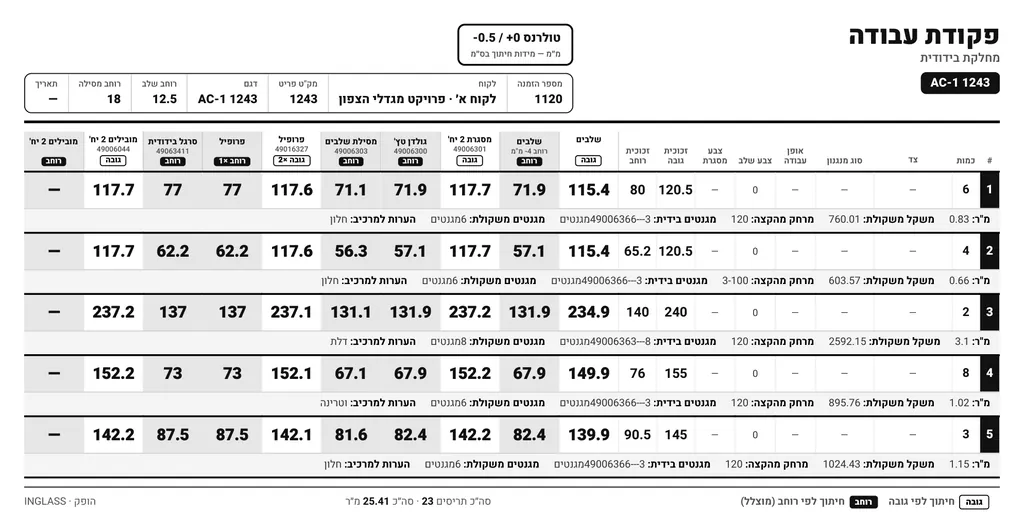
Reads the order from Priority ERP, calculates cutting sizes by the plant's production rules and outputs a production-ready work order.
Glass and blinds manufacturing plant, where I managed operations
- Before
- Every order was typed into Excel by hand, and cutting sizes were calculated manually.
- After
- A production-ready work order, straight from the Priority order.
The problem
Every order was typed into Excel by hand, and cutting sizes were calculated manually. It took time, and every manual step is one more chance for a mistake that reaches the production floor.
What I built
A tool that reads the order directly from Priority ERP via the API, calculates cutting sizes, magnet count and weight per unit according to the plant's production rules, and produces a production-ready work order PDF. It is in daily use.
How it works
- You enter an order number, and the tool pulls the order lines from Priority through the API.
- The tool calculates each line by the plant's production rules: cutting size per component, magnet count and weight per unit. The calculation builds on the workbook the plant already used, so the rules stay in one place.
- A work order PDF is generated, laid out the way production needs to read it, ready to print.
Want something similar in your business?
Tell me what takes up your time, and we will look at what a computer can take over.